 Flutter Kanpur
Building a Super App: How We Embedded an Entire Flutter Blogging Platform Inside Another Flutter App — Without Asking Users to Login Twice
Flutter • Supabase • Edge Functions • SSO • Architecture
One login → Two apps
Introduction
Imagine opening Instagram.
You're scrolling your feed, everything feels like one seamless product. Then you tap Marketplace.
Suddenly, it asks you to log in again.
That would feel broken. It would feel like two different apps stitched together with tape.
That's exactly the problem we ran into while integrating ReadMe — our standalone blogging platform — into Flutter Kanpur, our community app.
Two separate Flutter codebases. Two separate Supabase projects. One user, who should never have to think about either of those facts.
Here's how we made it invisible.

Section 1 — The Problem
At a glance, Flutter Kanpur and ReadMe look like they should just talk to each other:
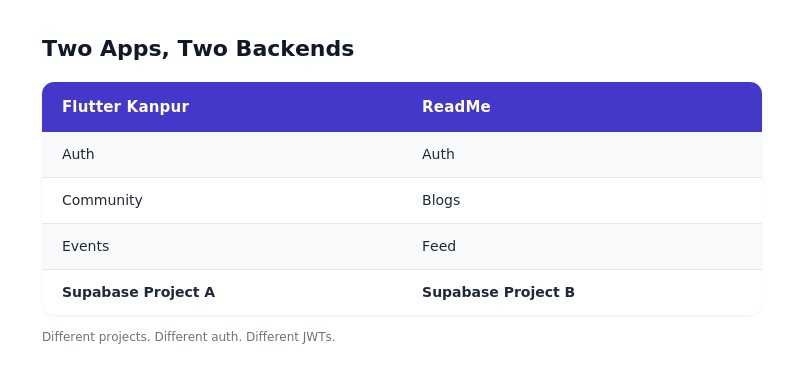
They share a naming convention. They share a design system. They share nothing underneath.
Different Supabase projects. Different auth schemas. Different JWTs, signed with different secrets, scoped to different aud and iss claims.
So when a logged-in Kanpur user opened the Blogs tab, this happened:
Flutter Kanpur
│
│ JWT (signed by Project A)
▼
ReadMe (Project B)
│
▼
"Who are you?"
Simple problem to state. Not a simple problem to solve.

Section 2 — Why We Didn't Just Merge the Databases
The tempting shortcut is obvious: throw everything into one Supabase project and call it a day. We considered it for about an afternoon.
❌ Merge the projects
A huge, risky migration of live user data
Kanpur and ReadMe forced onto shared release cycles
Every Row Level Security policy rewritten and re-audited
Two products permanently welded into one deploy pipeline
✅ Keep them separate
Independent release schedules — ReadMe ships without waiting on Kanpur, and vice versa
Each project scales on its own terms
Product teams keep autonomy over their own schema and roadmap
Smaller blast radius when something breaks
The two backends were never going to become one. So the problem wasn't "how do we unify the data" — it was "how do we unify the identity."
Section 3 — The Solution
The fix wasn't merging databases. It was teaching ReadMe to trust a signal from Kanpur without ever sharing a database, a secret, or a session directly.
Flutter App
│
▼
Kanpur Session (JWT)
│
▼
Edge Function ──────► Verify JWT
│ │
│ ▼
│ Find or Create User
│ │
│ ▼
│ Generate ReadMe Session
▼
ReadMe (now logged in)
The Edge Function is the whole trick. It sits between the two projects as a neutral verifier — it never shares a database connection, never exposes a service key to the client, and never lets ReadMe trust Kanpur blindly. It checks the token, then mints a brand-new, independent session for ReadMe.

Section 4 — The Flow, Step by Step
Instead of dumping one dense sequence diagram on you, here's the flow broken into five moments — because this is really a five-beat story, not a spec.
Step 1 — User opens Blogs The user taps the Blogs tab inside Flutter Kanpur. From their perspective, nothing has changed — they're still in the same app.
Step 2 — Kanpur sends its JWT Flutter Kanpur grabs the current Supabase session token and passes it along to a dedicated Edge Function endpoint. No credentials are re-entered. No new login screen appears.
Step 3 — The Edge Function verifies the JWT The function independently verifies the token's signature against Kanpur's Supabase project — not by trusting the client, but by checking it against the source of truth. A token that doesn't verify is rejected outright.
Step 4 — ReadMe creates a session Once verified, the function looks up (or provisions) a matching user record inside ReadMe's own Supabase project, then generates a fresh, independent session scoped entirely to ReadMe.
Step 5 — The user never notices anything happened The Flutter app swaps in the new ReadMe client session behind the scenes. The blog feed loads. No spinner-of-shame, no second login screen, no seam.
💡 Lesson Learned Never trust a token from another Supabase project at face value. It must be verified independently, every single time — treat it exactly like you'd treat a token from any third-party identity provider.
Section 5 — Flutter Integration
On the client, the trick was keeping the two Supabase clients cleanly separated so neither app could accidentally leak the other's session.
packages/
├── readme/
│ └── (ReadMe's own Supabase client, models, blog UI)
└── flutter_kanpur/
└── (Kanpur's Supabase client, community + events UI)
Each package owns its own client instance:
Supabase.instance.client → Kanpur's own session
ReadmeSupabase.client → ReadMe's own session, populated
only after the handoff above
That naming decision — ReadmeSupabase.client instead of quietly reusing Supabase.instance.client — turned out to be one of the more painful refactors of the whole project.

Section 6 — Security
Once the flow was working, the next question was: what happens if any single piece of this is compromised? The design holds up because each component only ever knows exactly as much as it needs to.
🔐 Service Key Never ships to the client. Lives only inside the Edge Function's server-side environment.
🔐 Edge Function Owns authentication end-to-end. It's the only component that ever sees both a Kanpur token and the ability to mint a ReadMe session.
🔐 Mobile App Only ever receives a finished session — it never sees a service key, never verifies a token itself, and never talks to ReadMe's database directly.
No single leaked artifact on the client side is enough to forge a session in the other project.
Section 7 — Problems We Faced
Not everything went cleanly. A few of these cost us more debugging time than the whole architecture design did.
❌ JWT mismatch Early on, we compared tokens using the wrong signing secret entirely — an easy mistake to make when two Supabase projects' environment variables look nearly identical in a .env file.
❌ Function not deployed We tested locally against a function that worked perfectly — and then discovered it had never actually been deployed to the environment the app was pointing at.
❌ Git package stale Because ReadMe's Flutter package was pulled in as a Git dependency, a forgotten flutter pub upgrade meant we spent an evening debugging behavior that had already been fixed three commits ago.
❌ Hot Reload doesn't reload .env Classic. Changed an environment variable, hit hot reload, spent twenty minutes confused why nothing changed — because Flutter's hot reload doesn't re-read .env files. Full restart required.
Meme: "Works on my machine." Production: 404.
Section 8 — Decision Matrix
Decision Winner Package delivery Git Dependency Backend structure Separate Projects Auth strategy Session Minting via Edge Function
Section 9 — What We'd Improve
This version solves the login problem. It doesn't solve everything.
Version 1
│
▼
Identity Provider (a real shared IdP, not a bridge function)
│
▼
Shared Profiles (one profile, synced across products)
│
▼
Analytics (unified usage tracking across both apps)
│
▼
Offline Sync
The Edge Function bridge got us to "invisible login." The next step is making identity itself a shared primitive instead of a translation layer.
Final Thoughts
Building a Super App Isn't About Tabs. It's About Identity.
It's tempting to think a "super app" is just several apps glued together behind a shared tab bar. It isn't. The tabs are the easy part. The hard part — the part users actually feel, even when they can't articulate it — is whether their identity follows them seamlessly from one experience to the next.
If users ever notice your authentication architecture, you've probably already lost.
Great authentication is invisible. That's exactly what we wanted while embedding ReadMe inside Flutter Kanpur — and, one Edge Function later, it is.
